SNGPL Bill Check Online
(Lahore, Islamabad, Peshawar, Multan, etc.)
Official source and freshness
Bill lookup flow last checked: September 5, 2026. This guide is independent of SNGPL and is meant to help you prepare the correct Account ID Consumer Number before opening the official bill page.
Open official SNGPL website
About SNGPL Services
Sui Northern Gas Pipelines Limited (SNGPL) is one of the major natural gas distribution companies in Pakistan, providing gas services to millions of consumers across Punjab, Khyber Pakhtunkhwa, and other areas. Consumers in cities such as Lahore, Faisalabad, Islamabad, Rawalpindi, Multan, Peshawar, Gujranwala, and surrounding regions can use online services to access their latest or duplicate SNGPL gas bills.
Our SNGPL bill checking service makes it easier to find your bill online without waiting for a paper copy. You can check your billing information using your 11-digit Consumer Number, also commonly shown as the Account ID on your SNGPL bill.
SNGPL Bill Check Online by Consumer Number
To check your SNGPL gas bill online, you need your 11-digit Consumer Number / Account ID. This unique number is printed on your previous SNGPL gas bill and is used to identify your gas connection.
How to Check Your SNGPL Bill Online
- Find your 11-digit Consumer Number / Account ID from an old SNGPL bill.
- Enter the number in the bill-checking box provided above.
- Click the Check Bill button.
- Your SNGPL bill information will be displayed through the available online billing service.
- You can view your bill details and, where available, download or print a duplicate copy for your records.
Consumer Number and Account ID
If you are confused about the terms Consumer Number and Account ID, don’t worry. Your SNGPL bill may display the same 11-digit identifier as an Account ID, while online services may refer to it as a Consumer Number. Always enter the number exactly as printed on your previous bill.
Sui Northern Gas Bill Online Check
SNGPL, commonly known as Sui Northern Gas, provides natural gas services to consumers across Punjab, Khyber Pakhtunkhwa (KPK), and other regions of Pakistan. If you search for “Sui Northern Gas Bill Online Check”, “SNGPL Bill Check”, or “SNGPL Gas Bill”, you are looking for the online billing service provided by Sui Northern Gas Pipelines Limited.
This page makes it easier to access the SNGPL online bill service without having to search through multiple pages of the official website. Simply use your Consumer Number / Account ID to check your latest available gas bill online.
Where to Find Your SNGPL Consumer Number / Account ID
Your SNGPL Consumer Number is generally shown as Account ID on your previous gas bill. It is an important identification number associated with your SNGPL gas connection and is required when checking your bill online.
You can usually find the 11-digit Account ID near the customer information section at the top of your SNGPL bill.
If you are checking the bill for a rented property, you can ask the property owner or previous tenant for an older SNGPL bill. Once you have the correct Account ID, enter it into the bill-checking form above to proceed.
Important Tip
Make sure you enter the complete 11-digit Account ID correctly. Even a single incorrect digit may prevent the system from finding the correct billing information.
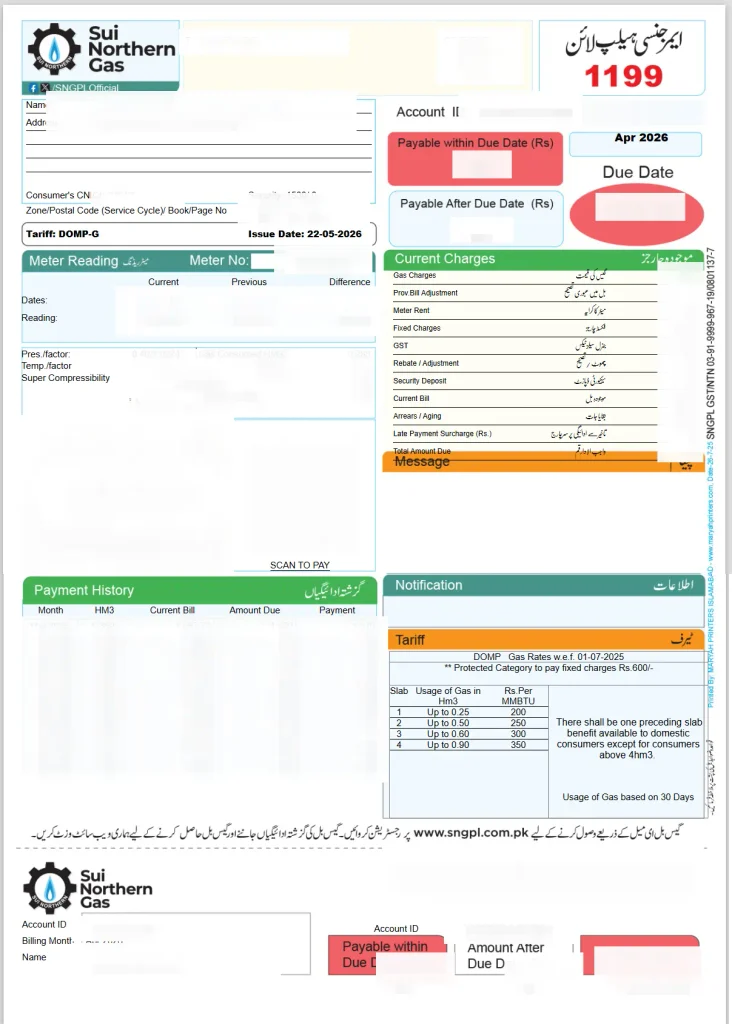
SNGPL Sample Bill and Account ID
A sanitized SNGPL sample bill can help you identify where the Account ID / Consumer Number appears. It is generally displayed near the top-right section of the bill and may also be repeated on the payment slip.
For your own bill, use the complete 11-digit Account ID / Consumer Number exactly as printed on the document.
What to Check After the Bill Opens
Once your SNGPL bill opens, carefully review the important billing details, including:
- Bill Month
- Total Payable Amount
- Due Date
- Previous Balance or Arrears
- Current Meter Reading
- Taxes and Government Charges
- Fixed Charges
- Any Adjustments or Additional Entries
Checking these details can help you understand whether the amount is for the current billing month or includes an older balance, adjustment, or other charge.
SNGPL Duplicate Bill Online Check
After your SNGPL bill opens, you can review the payable amount, due date, arrears, meter reading, taxes, and other billing information.
If you need a copy for your records, you can use your browser’s Print option and select Save as PDF to keep a digital copy of the bill.
After checking your bill, you can also learn about different ways to pay your gas bill through our gas bill payment methods guide.
SNGPL Service Areas
SNGPL provides natural gas distribution services mainly across Punjab, Khyber Pakhtunkhwa (KPK), and Azad Jammu & Kashmir (AJK).
Major cities and areas served include Lahore, Islamabad, Rawalpindi, Faisalabad, Multan, Peshawar, Gujranwala, Sialkot, Sargodha, and many surrounding regions.
If your gas connection is located in Sindh or Balochistan, you may need to use the relevant SSGC billing service instead. You can visit our SSGC duplicate bill tool for further guidance.
If Your SNGPL Bill Is Not Showing
If your SNGPL bill does not load, first check the Consumer Number / Account ID carefully. A single incorrect digit can prevent the billing system from finding your record.
You can try the following solutions:
- Wrong Account ID: Compare all 11 digits with an older bill and enter the number without unnecessary spaces or dashes.
- Captcha not loading: Refresh the official SNGPL billing page or try another modern browser.
- Official website is slow: Try again after a few minutes, especially during periods of heavy traffic or close to bill due dates.
- New bill is not available: If the current month’s bill has not yet been generated, check again later in the billing cycle.
If the issue continues, verify your Account ID using an older bill and contact SNGPL through its official customer support channels. For complaint assistance and relevant contact information, you can also refer to our Sui Gas helpline directory.
Using SNGPL Bill Check on Mobile
You can also check your SNGPL bill from a mobile phone, tablet, or desktop computer.
After entering your Consumer Number / Account ID on this page, the billing process directs you toward the official SNGPL bill service. On the official page, complete the captcha and submit the form to view your bill.
If the bill does not appear immediately, scroll to the billing form, verify your 11-digit number, and try again.
Why Your SNGPL Bill May Look Higher Than Expected
Sometimes an SNGPL bill may be higher than expected because of several factors, including gas consumption, consumer category, fixed charges, seasonal usage, applicable taxes, previous balances, or billing adjustments.
Your winter consumption pattern and applicable consumer category can also affect the amount shown on the bill.
For a simple explanation of the different categories, read our protected vs non-protected guide.
New SNGPL Connection & Online Application
If you are planning to apply for a new SNGPL gas connection or want information about an existing application, you can follow our SNGPL new connection guide.
The guide explains the application process, commonly required documents, application tracking, and other important information to help applicants understand the process.
Frequently Asked Questions About SNGPL Bill
Find quick answers to common questions about checking, downloading, and understanding your SNGPL gas bill online.
How can I check my SNGPL bill online? +
You can check your SNGPL gas bill online by using your 11-digit Consumer Number or Account ID. Enter the number in the bill-checking form and continue to the official SNGPL billing page to view your available bill.
Where can I find my SNGPL Consumer Number? +
Your SNGPL Consumer Number is generally shown as an Account ID on your previous gas bill. It is usually printed near the customer information section and may also appear on the payment slip.
How many digits is the SNGPL Account ID? +
The SNGPL Account ID / Consumer Number used for online bill checking is an 11-digit number. Enter all digits exactly as they appear on your previous SNGPL bill.
Can I check my SNGPL bill from my mobile phone? +
Yes. You can check your SNGPL bill using a smartphone, tablet, laptop, or desktop computer. You only need your 11-digit Consumer Number / Account ID and an internet connection.
Can I download or print my SNGPL duplicate bill? +
Yes. After your bill is displayed, you can use your browser’s Print option. You can print the bill or select Save as PDF to keep a digital copy for your records.
What should I do if my SNGPL bill is not showing? +
First, carefully check your 11-digit Account ID / Consumer Number. Make sure every digit is correct. You can also refresh the page, try another browser, or wait a few minutes if the official billing system is experiencing heavy traffic.
Why is my SNGPL bill higher than expected? +
Your bill can vary because of gas consumption, applicable consumer category, fixed charges, taxes, previous balances, seasonal usage, or billing adjustments. Review the bill details carefully to identify any additional charges or arrears.
What information can I see on my SNGPL bill? +
Depending on the available bill record, you can review details such as the bill month, payable amount, due date, previous balance, meter reading, taxes, fixed charges, and other billing entries.
Which areas are served by SNGPL? +
SNGPL primarily provides gas distribution services across Punjab, Khyber Pakhtunkhwa (KPK), and Azad Jammu & Kashmir. Major cities include Lahore, Islamabad, Rawalpindi, Faisalabad, Multan, Peshawar, Gujranwala, Sialkot, and Sargodha.
Can I check an old SNGPL bill online? +
The availability of previous bills depends on the billing service and records available for your connection. For older bills, keep previous paper or PDF copies for your records and check the available online billing information using your Account ID.