SNGPL Bill Check by Consumer Number – Easy Online Guide
If you want to check your monthly gas bill without waiting for a printed copy, SNGPL Bill Check by Consumer Number is a simple way to access your latest billing information online. Sui Northern Gas Pipelines Limited (SNGPL) provides an official online bill inquiry page where consumers can enter their consumer number and submit the required verification details.
Official Website
This guide explains how to check your SNGPL bill online, where to find your consumer number, how to save a duplicate bill, and what to do if your bill does not appear.
SNGPL Bill Check by Consumer Number – Step-by-Step Guide
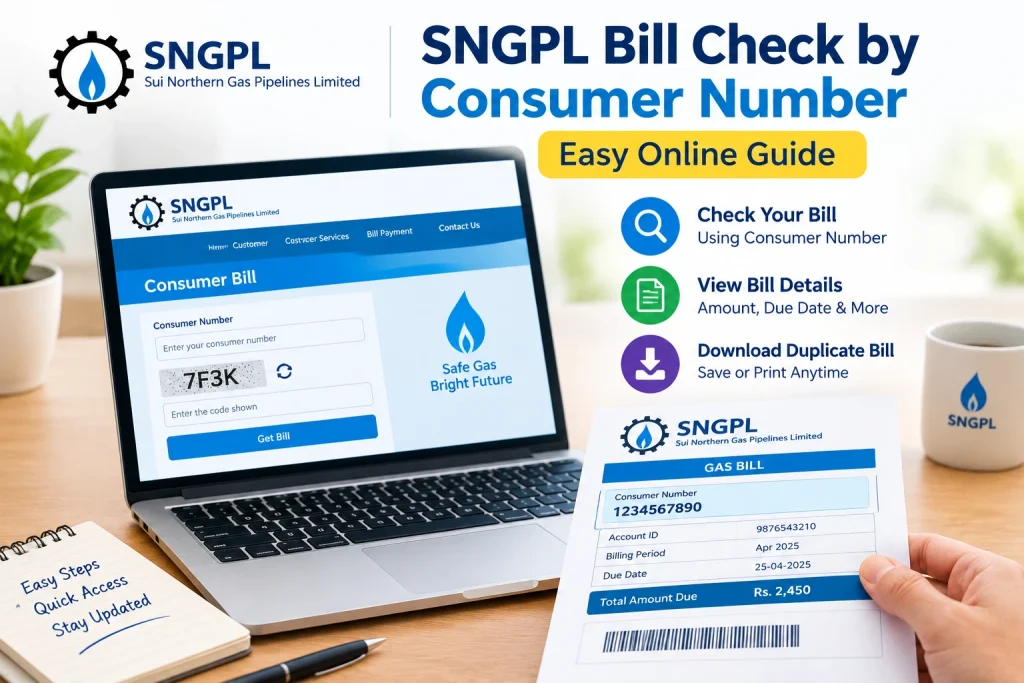
Follow these five steps to view your latest gas bill.
- Open the official website: Visit the SNGPL Consumer Bill page.
- Find your consumer number: Take your latest or previous gas bill and locate the consumer number printed on it.
- Enter the number: Type your consumer number into the required field on the official website.
- Complete the CAPTCHA: Enter the characters shown in the verification image.
- Submit your details: Click the Submit button and follow the instructions to access your bill.
The official SNGPL page contains a Consumer Bill form with a consumer number field and CAPTCHA verification.
Official Website
Once your bill is available, review the payable amount and due date. You can then save or print a copy if the bill is displayed in a printable format.
What Is an SNGPL Consumer Number?
An SNGPL consumer number is an identification number used to locate your gas connection in the company’s billing system. It is required by the online consumer bill service.
You can usually find it on a previous SNGPL gas bill. Look for the field labelled Consumer Number or the relevant account identification section.
Keep in mind that your consumer number and gas meter number are different identifiers. Use the number requested by the official bill portal rather than entering the number printed on the physical meter.
If you have misplaced your paper bill, check an older saved copy or contact SNGPL customer support for guidance.
How to Download an SNGPL Duplicate Bill
Need another copy of your gas bill for payment or personal records? You can use the official online bill service to retrieve your current bill.
Follow these steps:
- Open the official SNGPL Consumer Bill page.
- Enter your consumer number and complete the CAPTCHA.
- Submit the form to access the available bill.
- Open the browser’s print option if the bill is displayed.
- Select Save as PDF to store a digital copy, or print it on paper.
Keep the downloaded bill on your phone or computer so you can refer to its due date and payable amount when needed.
What Information Can You Check on Your SNGPL Bill?
After retrieving your bill, review the information available on the document. Depending on the bill format, it may include:
- Consumer details and account identification.
- Billing period and meter reading information.
- Gas consumption and applicable charges.
- Previous balance or outstanding amount, where applicable.
- Current payable amount and due date.
Always check the details carefully before making a payment. If you notice an unexpected charge or incorrect reading, contact SNGPL through its official customer service channels.
Why Is My SNGPL Bill Not Showing Online?
Sometimes the bill portal may not display the expected information. Try these troubleshooting steps.
Incorrect Consumer Number
Check the number against a previous bill and enter it again carefully. Avoid confusing it with your meter number.
CAPTCHA Error
Enter the verification characters as displayed. If they are unclear, refresh the CAPTCHA and try again.
Website or Internet Issue
Check your internet connection, refresh the page, or try another browser. You can also return to the portal later if the service is temporarily unavailable.
Latest Bill Is Not Available
If the new billing information is not displayed, it may not yet be available in the online system. Check again later or contact SNGPL for confirmation.
How to Pay After Checking Your SNGPL Bill
After reviewing your bill, you can use a supported payment channel to settle the amount. Options may include mobile banking, internet banking, Easypaisa, JazzCash, ATMs, and authorized payment locations, depending on the service provider.
Before confirming a transaction, verify the company name, consumer details, and amount. Save your receipt or transaction reference in case you need to follow up on a payment issue.
For payment information, visit the official SNGPL website.
Frequently Asked Questions
1. Can I check my SNGPL bill using a consumer number?
Yes. Open the official SNGPL Consumer Bill page, enter your consumer number, complete the CAPTCHA, and submit the form.
2. Where can I find my SNGPL consumer number?
Look at a previous gas bill and find the consumer number field in the account details section.
3. Can I download my SNGPL bill online?
You can access your bill through the official portal and use the browser’s print or Save as PDF option when available.
4. What should I do if my consumer number is not working?
Recheck the number on your previous bill, complete the CAPTCHA correctly, and try again. If the problem continues, contact SNGPL support.
5. Is the official SNGPL bill-check service available online?
Yes. SNGPL provides a Consumer Bill page on its official website for online bill inquiries.
Official Website
Conclusion
SNGPL Bill Check by Consumer Number provides a convenient way to access your gas bill without relying only on a printed copy. By entering the correct consumer number and completing the required verification, you can check the available bill information and save a copy for your records.
Always use the official SNGPL website, review your due date, and verify the payable amount before making a payment. If your bill is missing or the information appears incorrect, contact SNGPL through its official support channels.