SNGPL Bill History Online – How to Check Previous Bills
Checking your previous gas bills can help you track monthly expenses, verify past payments, compare gas consumption, and resolve billing issues. With SNGPL Bill History Online, consumers can explore the available digital services to review billing records and manage their gas bills more conveniently.
Sui Northern Gas Pipelines Limited (SNGPL) provides online consumer services, and its consumer mobile app has included features for viewing current bills, billing history, payment information, and complaints. The options available to you may depend on the service and account access you use.
In this guide, you will learn how to check previous SNGPL bills, access available billing history, save a duplicate bill, verify payments, and get help if an older bill is not available online.
What Is SNGPL Bill History Online?
SNGPL Bill History Online refers to accessing your available past gas billing records through SNGPL’s digital services. These records can help you review previous bill amounts, billing periods, consumption information, and payment details where provided.
Consumers may need their previous bills for several reasons:
- To compare monthly gas expenses.
- To check whether a previous bill was paid.
- To review earlier gas consumption.
- To keep records for household budgeting.
- To investigate an unexpected increase in charges.
- To support a billing complaint with relevant information.
Important: Checking the latest bill and viewing historical bills are not necessarily the same service. The online bill page may show the current or latest bill, while the mobile app or consumer account may provide additional history features.
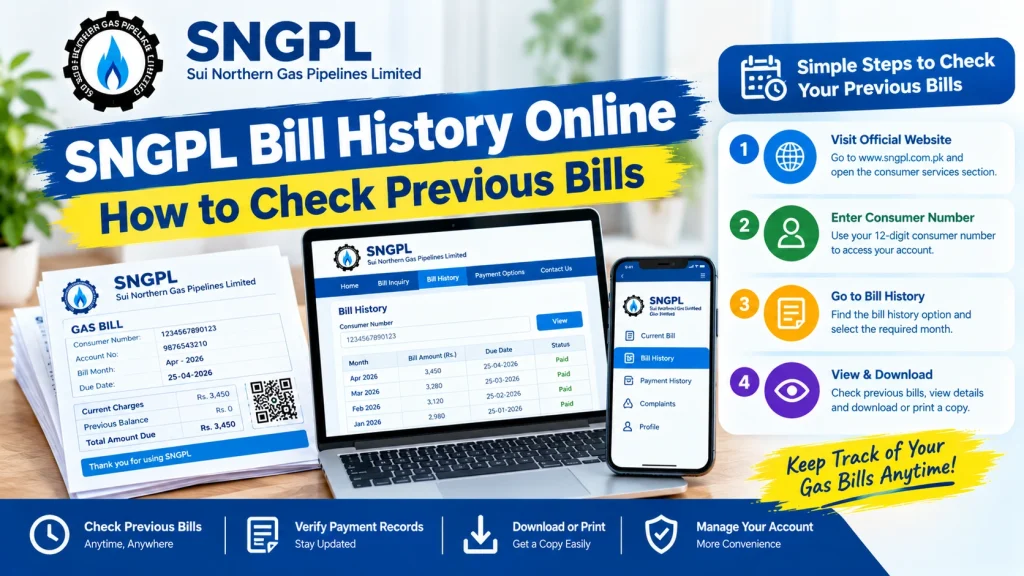
How to Check SNGPL Bill History Online
Follow these steps to look for your previous SNGPL billing records.
Step 1: Visit the Official SNGPL Website
Open the official SNGPL website in your browser. Look for the consumer services or bill-related section.
Using the official website helps you avoid entering your account details on an unfamiliar third-party page.
Step 2: Find Your Consumer Number
Keep an old gas bill nearby. Find the consumer number or account ID printed on the bill. You may need this number to identify your gas connection.
Enter the number exactly as shown when the service requests it. Avoid confusing your consumer number with the gas meter number.
Step 3: Check the Available Bill Information
Open the relevant consumer bill service and follow its instructions. Depending on the service, you may be asked to enter your consumer number and complete a verification step.
The standard online bill lookup is useful for viewing the available current or latest bill. If you need records from earlier months, check whether a billing history option is available in your consumer account or mobile app.
Step 4: Open the Billing History Feature
If you use the SNGPL consumer mobile app, look for an option labelled History, Bill History, or similar wording. The exact menu and available features can vary by app version.
Select the relevant billing period if previous bills are listed. Check the month and year carefully before opening or saving a record.
Step 5: Review Your Previous Bill Details
When a previous bill is available, review the information shown. Depending on the record, this may include:
- Billing month and period.
- Total amount payable.
- Due date.
- Gas consumption or meter readings.
- Previous balance or arrears.
- Payment information, if available.
If the record is incomplete or does not match your own receipt, contact SNGPL through its official customer service channels.
How to Check Previous Bills Using the SNGPL Mobile App
The SNGPL consumer mobile app has offered billing-related features, including current bill viewing, duplicate bill access, payment services, and billing history. These features can make it easier to manage your gas account without keeping every paper bill.
To check your previous bills through the app:
- Find the official SNGPL consumer app through a trusted app store or follow the app link from SNGPL’s official website.
- Install or open the app.
- Follow the available registration or consumer-account linking instructions.
- Enter the required consumer information.
- Complete any verification requested by the app.
- Open the billing or history section.
- Select an available previous billing period and review its details.
The exact registration process and menu names may change with app updates. If the app does not show older bills, check for an update or contact SNGPL for guidance.
Never share your account password, PIN, or one-time verification code with another person.
How to Download or Print an SNGPL Duplicate Bill
Sometimes you do not need a complete history; you only need a copy of one particular bill. In that case, the duplicate bill service may be sufficient if the required billing period is available.
Follow these general steps:
- Open the relevant SNGPL bill service.
- Enter your consumer number if requested.
- Complete any on-screen verification.
- Open the bill that the service makes available.
- Use the print option in the bill page or your browser.
- To save a digital copy, select Save as PDF in the print dialog, if available.
If the bill history feature offers a download option for previous months, use it to save the required record.
Save the file with a clear name, such as SNGPL-Bill-July-2026.pdf, so you can find it easily later. Remember that a latest-bill lookup may not provide every earlier month’s bill.
How to Check SNGPL Bill Payment History
If you want to confirm a past payment, checking the bill amount alone may not be enough. A bill can show an outstanding balance even if you recently made a payment that has not yet been reflected.
Use these steps to review your payment information:
- Open the banking app, mobile wallet, or service you used to pay.
- Go to the transaction history section.
- Find the payment made to SNGPL.
- Check the transaction date, amount, and reference or transaction ID.
- Compare the payment with your gas bill.
- Save the receipt or transaction confirmation.
You can also check whether the SNGPL consumer app provides a payment history or status feature for your account.
If a payment is missing from the bill record, keep your transaction receipt and contact the payment provider or SNGPL through its official channels. Do not pay the same bill again until you have checked the transaction status and outstanding amount.
What If Your Previous SNGPL Bill Is Not Available Online?
You may not always find every historical bill through the standard online bill-checking page. Try the following options.
Check the Consumer App
Look for the billing history feature in the official consumer app. If your account is not linked, follow the app’s registration instructions.
Search Your Email or Phone
If you previously registered for electronic bills or received billing notifications, search your email inbox and messages for SNGPL bill records. Availability depends on your registration and the messages you retained.
Check Old Payment Receipts
Bank statements, mobile wallet transaction histories, and payment receipts can help you confirm previous payments even when the original bill is missing.
Contact SNGPL Customer Support
If you need an older bill for an official purpose, contact SNGPL through its official website or visit a customer service centre. Explain the billing period you need and ask which records can be provided.
Keep your consumer number and any relevant payment proof ready. You may be asked to verify account details before receiving billing information.
Benefits of Keeping Your SNGPL Bill History
Maintaining your own gas bill records can save time and make it easier to identify billing issues.
1. Track Monthly Expenses: Compare bills over several months to understand changes in household gas costs.
2. Review Consumption: Compare available meter readings and consumption details to identify unusual changes that may need investigation.
3. Verify Payments: Keep transaction receipts alongside your bills so you can confirm when a payment was made.
4. Resolve Billing Issues: Previous bills can help you explain a discrepancy when contacting customer support.
5. Maintain Digital Records: Saving PDF copies can help when you need to refer to an earlier billing period or print a copy.
For easier recordkeeping, create a folder on your phone or computer and name each bill by month and year.
Frequently Asked Questions
1. How can I check SNGPL Bill History Online?
Visit the official SNGPL website for bill services or use the official consumer app if its billing history feature is available. Follow the instructions and use your consumer number when required.
2. Can I check previous SNGPL bills using my consumer number?
Your consumer number identifies your gas connection and may be required to access online bill services. However, entering the number on the standard bill page does not necessarily display every historical bill.
3. Can I download an old SNGPL bill?
You can download or print a bill if the relevant service makes that billing period available. If the older record is missing, check the consumer app or ask SNGPL how to obtain it.
4. How can I check whether my SNGPL bill has been paid?
Review your banking or mobile wallet transaction history and compare it with the available bill information. Keep the transaction receipt in case you need to report a payment discrepancy.
5. Is SNGPL bill history available on mobile?
SNGPL has described billing history as one of the features of its consumer mobile app. Available functions may vary by app version and account access.
6. What should I do if my bill history is missing?
Check that you have linked the correct consumer account, review the app’s available options, and contact SNGPL if the required billing period remains unavailable.
7. Is the SNGPL website free to use for bill checking?
SNGPL provides online consumer services through its official website. Use the official service and check any specific terms shown on the page you access.
Conclusion
SNGPL Bill History Online can help consumers manage their gas bills, review available previous billing records, and keep track of payments. Start with the official SNGPL website or consumer mobile app, use the correct consumer number, and check the billing history section for earlier records.
If an older bill is not available online, review your saved receipts and electronic records or contact SNGPL for assistance. Keeping monthly bills and payment confirmations together will make future bill comparisons and billing complaints easier to manage.