SNGPL Gas Bill Due Date – How to Check Your Payment Deadline
SNGPL Gas Bill Due Date is an important detail every Sui Gas consumer should check before making a monthly payment. Paying your gas bill within the given time helps you avoid applicable late payment charges and prevents unnecessary payment problems.
Sometimes consumers do not receive their printed bills on time, while others misplace their bills or forget the payment deadline. Fortunately, you can check your latest available SNGPL bill online and find the due date without waiting for a paper copy.
In this guide, you will learn how to check your SNGPL gas bill due date, find the deadline printed on your bill, download a duplicate copy, and understand what to do if you miss the payment date.
For official gas billing information and consumer services, visit the SNGPL official website. Consumers can use the company’s official platform to access available services and important updates.
What Is the SNGPL Gas Bill Due Date?
The SNGPL Gas Bill Due Date is the last payment date printed on your monthly gas bill. It tells you when the bill should be paid to avoid the applicable late payment surcharge.
Each consumer should check their own bill because payment deadlines may differ according to billing cycles and bill issue dates. Never assume that your due date is the same as another household’s deadline.
Your gas bill normally includes several important details:
- Billing month
- Consumer number
- Meter reading information
- Total payable amount
- Bill issue date
- Last date for payment
- Late payment information, where applicable
Always use your latest bill to confirm the correct payment deadline.
How to Check SNGPL Gas Bill Due Date Online in 7 Easy Steps
You can check your payment deadline by viewing your latest available gas bill online. Follow these simple steps.
Step 1: Open the Official SNGPL Website
Visit the official Sui Northern Gas Pipelines Limited website:
Look for the available online bill or consumer services. Make sure you are using the official website or a trusted bill-checking service.
Step 2: Keep Your Consumer Number Ready
Before checking your bill, keep your SNGPL consumer number available. You can find it on a previous gas bill.
Enter the correct number when the online service requests it. Carefully check the digits to avoid retrieving information for the wrong account.
Step 3: Enter Your Consumer Information
Open the relevant bill-checking option and enter the required consumer details. Follow the instructions displayed on the page.
If the service asks for additional information, provide it exactly as printed on your previous bill.
Step 4: Submit Your Details
Click the Search, Submit, or View Bill option, depending on the service. Wait while the system retrieves your available billing information.
If the bill does not appear, check your consumer number and try again.
Step 5: Open Your Latest SNGPL Gas Bill
When your bill appears, check the consumer details and billing month. Make sure you are viewing the latest available bill rather than an older billing record.
Step 6: Find Your Payment Deadline
Look for the section labelled Due Date, Payment Due Date, or Last Date for Payment.
This is the deadline you should follow. Also review the payable amount and any late payment information shown on the bill.
Step 7: Download or Print Your Bill
If the service provides a download or print option, save a PDF copy of your gas bill.
Keeping a digital copy helps you check your payment deadline later and provides a useful record of your monthly charges.
Where Can You Find the Due Date on an SNGPL Bill?
The payment deadline is usually displayed in the bill’s payment information section. Its exact position may vary depending on the bill layout.
When reviewing your gas bill, look for these details:
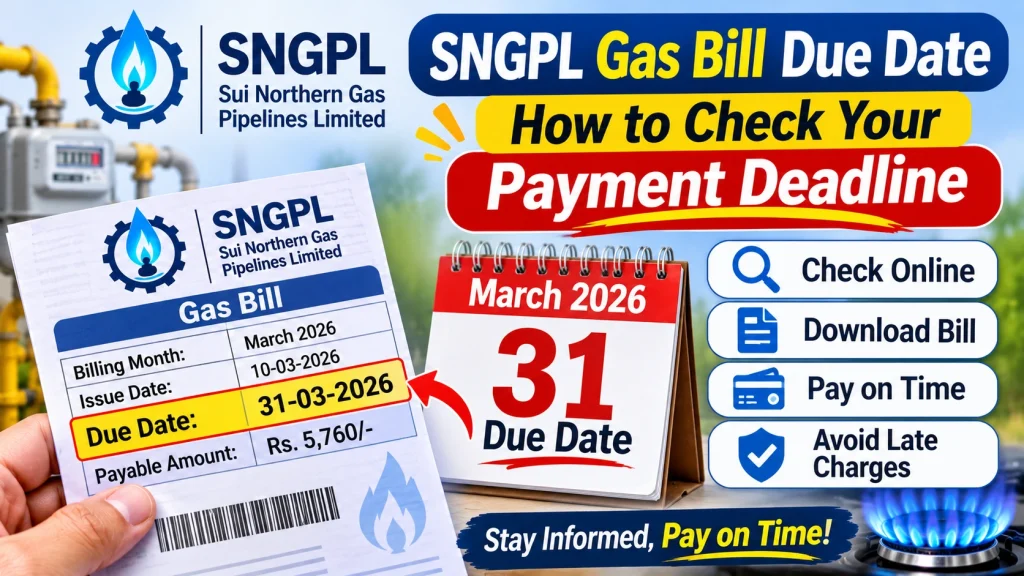
Billing Month: Shows the month for which gas charges have been calculated.
Issue Date: Shows when the bill was generated.
Due Date: Shows the last specified date for payment.
Payable Amount: Shows the amount due within the specified payment period.
Amount After Due Date: May show the amount payable after applicable late charges.
Do not confuse the bill issue date with the payment deadline. Always check the field specifically marked as the due date.
What Happens If You Miss the SNGPL Gas Bill Due Date?
If you pay after the specified deadline, an applicable late payment surcharge may be added according to the current billing rules.
This can make the amount payable higher than the original bill amount. The exact amount depends on the bill and applicable rules.
If you miss the deadline, follow these steps:
- Open your latest available SNGPL bill.
- Check the updated payable amount.
- Review any late payment surcharge shown.
- Pay through an authorized payment channel.
- Save your transaction receipt.
If you do not understand the additional charges, contact SNGPL through its official customer-service channels.
How to Download a Duplicate SNGPL Gas Bill Before the Due Date
If your printed gas bill has not arrived or you have lost it, you may be able to retrieve a duplicate copy through the available online bill service.
Follow these steps:
- Visit the official SNGPL website or an available bill-checking service.
- Enter the required consumer information.
- Submit your details.
- Open the latest available billing record.
- Check the due date and payable amount.
- Download or print the bill if the option is available.
A duplicate bill helps you confirm your payment deadline without waiting for the original paper copy.
How to Pay Your SNGPL Gas Bill Before the Deadline
After checking your due date, use an authorized payment channel supported by your bank or payment provider.
Common payment options may include:
- Mobile banking applications
- Internet banking
- ATM services
- Bank branches
- Supported mobile wallets
- Other authorized bill payment services
Before confirming the transaction, check your consumer details and payment amount. After payment, save your receipt or transaction ID.
If your payment is successful but the bill still shows unpaid, verify the transaction with your payment provider before paying again.
Common Problems When Checking SNGPL Gas Bill Due Date
Consumers may sometimes face problems while viewing their latest gas bills online. Here are some common issues and possible solutions.
Incorrect Consumer Number
If the system cannot find your bill, check the consumer number printed on your previous bill. Enter it carefully and avoid typing unnecessary spaces or characters.
Latest Bill Is Not Available
A newly generated bill may not appear immediately on every online service. Try again later or contact SNGPL if the issue continues.
Website Is Not Opening
The website may be temporarily unavailable because of maintenance, heavy traffic, or an internet connection problem. Refresh the page or try again after some time.
Old Billing Information Is Showing
Check the billing month before relying on the displayed due date. If an older bill appears, try again later to access the latest available record.
Tips to Avoid Missing Your SNGPL Payment Deadline
Follow these simple habits to manage your monthly gas bill more easily:
- Check your gas bill as soon as it becomes available.
- Save a PDF copy of every monthly bill.
- Note the due date in your calendar.
- Set a reminder a few days before the deadline.
- Pay early instead of waiting until the last day.
- Keep your payment receipt until the transaction is confirmed.
- Check your consumer details before making payment.
These precautions can help you avoid payment delays and unnecessary late charges.
Frequently Asked Questions
1. How can I check my SNGPL Gas Bill Due Date online?
Visit the official SNGPL website or an available bill-checking service, enter the required consumer information, and open your latest available bill. The payment deadline is printed in the bill’s payment details section.
2. Can I check my SNGPL due date without a printed bill?
Yes. If you have your consumer number from an older bill, you may use it to retrieve your latest available billing information online.
3. What is the last date to pay an SNGPL gas bill?
The last payment date is the due date printed on your individual monthly bill. It can differ between consumers, so always check your latest bill.
4. What happens if I pay my SNGPL bill after the due date?
An applicable late payment surcharge may be added according to the current billing rules. Check the updated payable amount before making payment.
5. Can I download my SNGPL duplicate bill online?
You may be able to view and download a duplicate bill through the available online bill service. Keep your consumer information ready.
6. Why is my SNGPL bill not showing online?
Your latest bill may not have been uploaded yet, or the online service may be temporarily unavailable. Check your consumer number and try again later.
7. Should I pay my SNGPL bill on the due date?
It is better to pay a few days before the deadline. Early payment gives you time to resolve transaction delays or other payment problems.
Conclusion
SNGPL Gas Bill Due Date is an important part of your monthly billing information. Checking it on time helps you plan your payment and avoid applicable late payment charges.
You can view your latest available gas bill online, confirm the payment deadline, and download a duplicate copy when needed. Always check the billing month, consumer details, and payable amount before making a payment. Keep your transaction receipt as proof and contact SNGPL if you find an incorrect charge or payment-related issue.