SNGPL Bill Payment Through Easypaisa – Step-by-Step Guide
Paying your monthly gas bill does not have to involve visiting a bank or waiting in long queues. With SNGPL Bill Payment Through Easypaisa, you can pay your Sui Northern Gas Pipelines Limited (SNGPL) bill using your mobile phone, provided the service is available in your Easypaisa app.
This guide explains how to pay your SNGPL gas bill through Easypaisa, which information you need, how to confirm a successful transaction, and what to do if your payment fails or your bill still appears unpaid.
What Is SNGPL Bill Payment Through Easypaisa?
SNGPL Bill Payment Through Easypaisa is a digital payment method that allows eligible customers to pay their gas bills using the Easypaisa mobile wallet. Instead of visiting a payment counter, you can open the app, select the gas bill payment option, enter your account details, and confirm the payment.
SNGPL lists branchless banking applications, including Easypaisa, among its available payment channels. However, the options displayed in your Easypaisa app may vary, so always check the available billers before proceeding.
Requirements for Paying Your SNGPL Bill Through Easypaisa
Before starting the payment process, prepare the following:
- Easypaisa account: Access to your account and its required authentication method.
- SNGPL consumer or account number: Find the required number on your gas bill.
- Sufficient wallet balance: Make sure your balance covers the payable amount and any applicable fee.
- Internet connection: You generally need internet access to use the mobile app.
- Latest bill details: Keep your current bill available so you can verify the amount and due date.
Having these details ready can help you complete the payment without unnecessary delays.
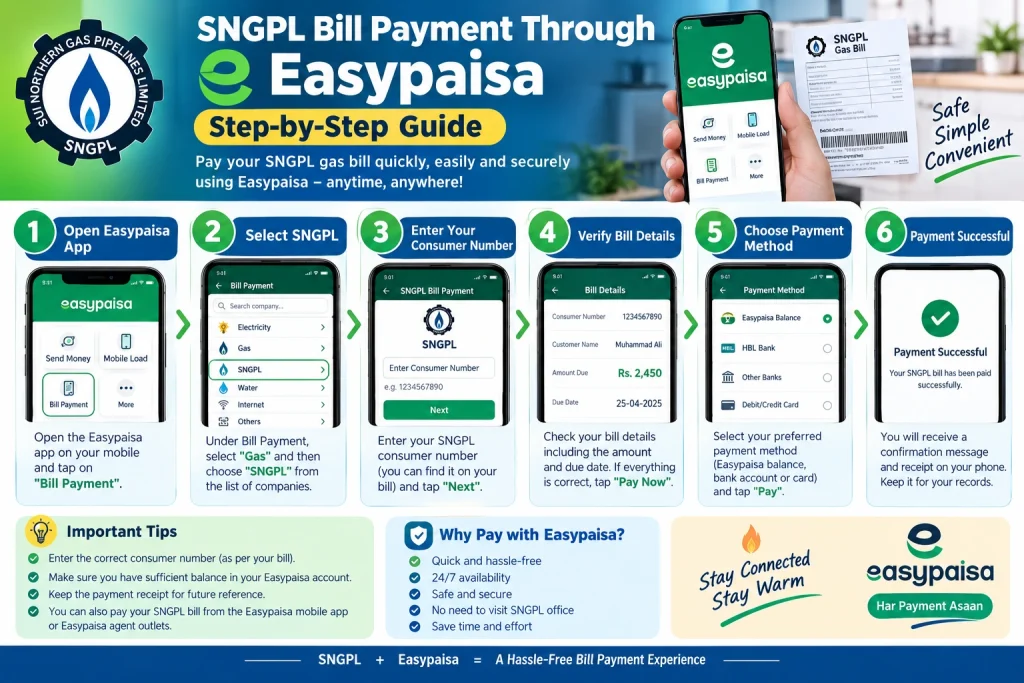
How to Pay SNGPL Bill Through Easypaisa: 7 Easy Steps
Follow these steps to pay your gas bill through the Easypaisa app.
Step 1: Open the Easypaisa App
Open the official Easypaisa app on your smartphone and sign in using your available authentication method. Make sure you are using the genuine app and never share your PIN or OTP with another person.
Step 2: Select Bill Payment
Find the Bill Payment or similarly named option on the home screen. The exact menu layout may differ depending on your app version.
Step 3: Choose Gas as the Bill Category
Open the utility bill categories and select Gas. You should see the supported gas companies if the option is available in your account.
Step 4: Select SNGPL
Choose SNGPL (Sui Northern Gas Pipelines Limited) from the list. Do not select SSGC by mistake, because it is a different gas utility serving other regions.
Step 5: Enter Your Consumer or Account Number
Enter the number requested by the app. Check your printed gas bill to find the correct consumer or account identifier.
Enter the digits carefully. A wrong number could retrieve another customer’s bill or prevent the app from finding your account.
Step 6: Verify Your Bill Details
If the app retrieves your bill, check the displayed consumer information, payable amount, and any available due-date details.
Compare the information with your actual SNGPL bill. If the details do not match, cancel the transaction and verify your account number before trying again.
Step 7: Confirm the Payment
If all details are correct and your wallet has sufficient funds, follow the app’s confirmation instructions and authenticate the payment.
Wait for the transaction result. Save the receipt, transaction ID, or confirmation message for your records.
How to Check Whether Your SNGPL Bill Payment Was Successful
After completing the payment, check the transaction status in your Easypaisa transaction history. Look for a successful payment entry and keep the transaction reference.
You should also check your SMS notifications, if available. A confirmation message can provide useful evidence that the transaction was processed.
Remember that a successful wallet transaction and an updated gas bill record are not always reflected at precisely the same time. If the payment is successful but your bill still appears unpaid, keep the receipt and check the status again later.
What to Do If Easypaisa Cannot Find Your SNGPL Bill
Sometimes the app may not retrieve your bill. This can happen because of an incorrect account number, a temporary service issue, or an unavailable biller.
Try these solutions:
- Recheck the consumer or account number printed on your gas bill.
- Confirm that you selected SNGPL rather than SSGC.
- Check your internet connection and reopen the app.
- Try again later if the bill-payment service appears temporarily unavailable.
- Contact Easypaisa support or SNGPL through official channels if the problem continues.
Do not repeatedly submit payments if the status of an earlier transaction is uncertain.
Easypaisa Deducted Money but SNGPL Bill Is Still Unpaid
If money has been deducted from your Easypaisa account but the gas bill still shows an outstanding amount, first check the transaction status.
If the transaction is pending: Wait for the app to provide a final status and avoid paying again until the first transaction is clarified.
If the transaction is successful: Save the receipt and transaction ID, then allow time for the payment record to update.
If the transaction failed but money was deducted: Contact Easypaisa support with the transaction details and ask them to investigate.
If necessary, contact SNGPL to confirm whether the payment has been received. Never share your Easypaisa PIN or OTP while seeking support.
Can You Pay an Overdue SNGPL Bill Through Easypaisa?
You may be able to pay an overdue bill if Easypaisa retrieves it and allows the transaction. Before confirming, review the payable amount and any late-payment surcharge shown on the bill or in the app.
If the amount is not available or the bill cannot be processed, contact SNGPL or use another officially supported payment channel. Do not assume that an overdue bill will always be accepted through every payment service.
Frequently Asked Questions
1. Can I pay my SNGPL bill through Easypaisa?
Yes. SNGPL lists Easypaisa among its branchless banking payment channels. Check your app to confirm that SNGPL bill payment is currently available.
2. What information do I need to pay my gas bill?
You generally need the consumer or account number requested by the app, sufficient wallet balance, and access to your Easypaisa account.
3. Is Easypaisa gas bill payment free?
Charges, if any, depend on the current service terms. Review the amount and any fee displayed before confirming your transaction.
4. How can I get proof of payment?
Save the digital receipt or transaction ID and retain any confirmation SMS. These details may be needed if you have to report a payment issue.
5. What should I do if I enter the wrong consumer number?
Do not confirm the payment if the displayed account details are incorrect. If the transaction has already completed, contact Easypaisa support immediately and keep your transaction reference.
6. Where can I find official SNGPL information?
Visit the official website at https://www.sngpl.com.pk/ to review available payment channels and customer services.
Conclusion
SNGPL Bill Payment Through Easypaisa offers a convenient way to pay your monthly gas bill without visiting a payment counter. Open the app, select the gas category, choose SNGPL, enter your account details, verify the payable amount, and confirm the transaction.
Always double-check the consumer information before paying and save your transaction receipt. If the payment fails or your bill remains unpaid after a successful transaction, contact the relevant support service and keep your transaction details ready.