SNGPL Bill Payment Methods – Mobile Apps and Online Banking
Paying your gas bill on time helps you avoid late payment charges and service-related problems. Today, consumers can use several digital payment options instead of visiting a bank or payment counter. Understanding the available SNGPL Bill makes it easier to pay from home using a mobile phone, internet banking, or a supported payment app.
Sui Northern Gas Pipelines Limited (SNGPL) supplies natural gas to consumers across many areas of Pakistan. Customers should check their latest bill, confirm the amount due, and use a reliable payment channel to complete the transaction securely.
SNGPL Bill payment is now easier with mobile banking apps, internet banking, and supported digital wallets. Customers can pay their gas bills online, check due dates, and save digital receipts without visiting a payment counter. This guide explains the most convenient SNGPL Bill Payment Methods and how to make secure payments.
Why Choose Online SNGPL Bill Payment?
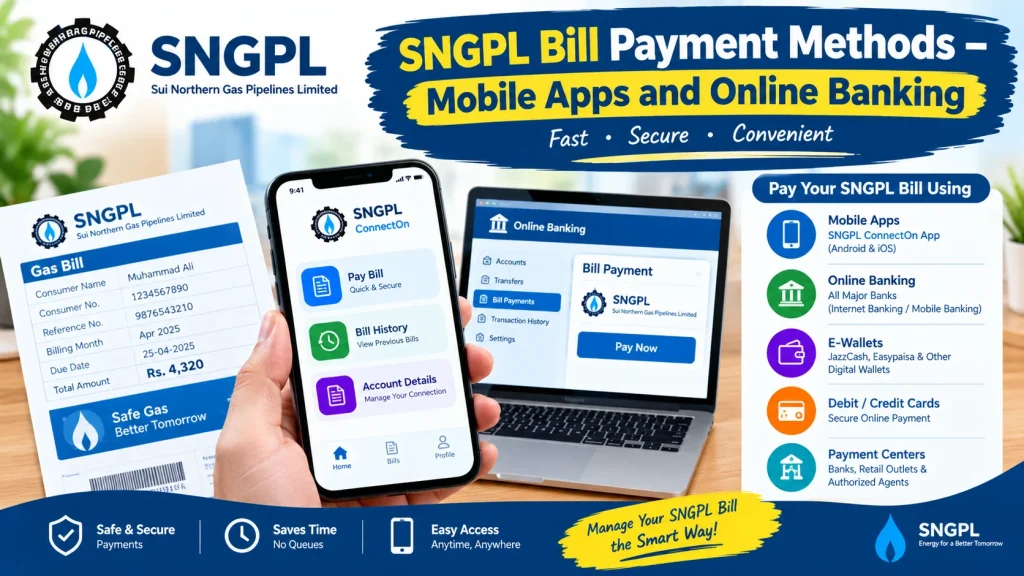
Online payments save time and reduce the need to stand in long queues. Most digital services are accessible through smartphones, making bill management more convenient for busy households.
Key benefits include:
- Convenience: Pay from home or while travelling.
- Time savings: Avoid unnecessary trips to payment counters.
- Digital records: Keep transaction receipts for future reference.
- Flexible access: Use supported mobile apps or internet banking.
- Easy bill management: Check the due date before making a payment.
Availability depends on your bank, payment app, and the services supported for your consumer account.
1. Pay Your SNGPL Bill Through Mobile Banking Apps
Mobile banking is a convenient option for customers whose banks support utility bill payments. Many banking apps provide a bill-payment section where users can select a bill category and enter the required consumer details.
Follow these general steps:
- Open your bank’s official mobile banking app.
- Sign in using your registered credentials.
- Find the Bill Payments or Utility Bills section.
- Select the gas utility option and choose SNGPL if listed.
- Enter the required consumer number or reference details.
- Check the displayed bill amount and due date.
- Confirm the payment and save the receipt or transaction ID.
The exact menu names may differ between banks. Always verify the bill information before confirming the transaction.
2. Use Internet Banking to Pay Your Gas Bill
Internet banking is another useful option for customers who prefer paying bills through a computer or mobile browser. It can be especially helpful when you need to review your account and transaction history.
To pay through internet banking:
- Visit your bank’s official website.
- Log in through its secure internet banking portal.
- Open the utility or bill-payment section.
- Select SNGPL if the service is available.
- Enter your consumer information and retrieve the bill.
- Confirm the amount before submitting the payment.
- Save the confirmation page or transaction reference.
Never enter your banking password or one-time verification code on an unfamiliar website. Use only the official portal of your bank.
3. Pay Through Supported Digital Wallets
Some digital wallets and payment applications offer utility bill payments. However, available billers and features can change, so check the app directly to confirm whether SNGPL is currently supported.
The usual process is straightforward:
- Open the official wallet app.
- Sign in and ensure your wallet has sufficient funds.
- Select bill payments or utility services.
- Choose SNGPL if it appears in the available list.
- Enter the required consumer details.
- Review the bill information and approve the payment.
- Keep the digital receipt until the payment is reflected in your records.
Do not assume that every wallet supports every utility. If SNGPL is not listed, use another verified payment channel.
4. Check Your Bill Before Making a Payment
Before choosing among different SNGPL Bill Payment Methods, review your latest bill carefully. Checking the details helps you pay the correct amount and avoid mistakes.
Confirm the following information:
- Consumer number or other required account details
- Total amount payable
- Due date
- Billing period and meter reading
- Any previous balance or applicable charges
You can visit the official SNGPL website at https://www.sngpl.com.pk/ to look for official billing information and available customer services. Follow the instructions provided by SNGPL for your account and area.
5. What to Do If Your Online Payment Fails
A failed or delayed transaction does not always mean the bill remains unpaid. Your bank or payment service may take time to update the transaction status.
If a payment issue occurs:
- Check whether the amount was deducted from your account.
- Review the transaction history in your banking app or wallet.
- Save the transaction ID and payment confirmation.
- Avoid paying again immediately if the first transaction is still pending.
- Contact your bank or payment provider if the status remains unclear.
- Verify the bill status through an official channel before making another payment.
If money was deducted but the payment is not reflected, provide the transaction reference to the relevant provider so it can investigate.
6. Tips for Safe and Timely Bill Payments
Following a few basic precautions can help protect your money and personal information.
- Pay before the printed due date whenever possible.
- Use official banking apps and trusted payment services.
- Double-check the consumer number before submitting a payment.
- Never share your password, PIN, or one-time verification code.
- Keep screenshots or receipts until the payment is confirmed.
- Avoid links in suspicious messages claiming that your gas supply will be disconnected immediately.
For account-specific questions, contact SNGPL through the contact details published on its official website.
Frequently Asked Questions
Can I pay my SNGPL bill using a mobile phone?
Yes, if your bank or supported payment app offers SNGPL bill payment. Check the available utility billers inside the official app.
Is online gas bill payment available 24/7?
Many digital payment services are available outside normal banking hours, but maintenance, transaction limits, or temporary service interruptions may affect availability.
What should I do if I enter the wrong consumer number?
Check the information before confirming a payment. If you have already submitted it, contact the payment provider immediately and provide the transaction details.
Should I keep my payment receipt?
Yes. Keep your transaction ID or digital receipt until the payment is confirmed and your records are updated.
Conclusion
Choosing a suitable digital payment channel can make monthly gas bill management easier. Mobile banking, internet banking, and supported digital wallets provide convenient alternatives to in-person payments. By comparing the bill details, checking the due date, and saving your receipt, you can use SNGPL Bill Payment Methods more confidently and reduce the risk of payment errors. Always confirm service availability through your bank, payment provider, or the official SNGPL website before completing a transaction.